1. Home
  2. DevOps
  3. Transport management

Find the transport request behind any SAP setting

A setting changed and nobody knows who did it. SE03 finds the request that carries it in three screens, and the task owner tells you who to ask. Below: the transactions that create, release and import requests, and how a request travels from development to production.

  • SE03
  • SE09 · SE10
  • SE01
  • STMS
  • E071K
Anatomy of a request number

S4PK999999

<SID>
The system where the request was created
K
Always the fourth character
9nnnnn
The running number, which starts with 9 in customer systems

Tasks are named the same way, and requests can only be changed in the system that created them. SAP deliveries start with SAP instead. The example is the task in the screenshots below.

Example: who changed OKB9?

Find the request in three screens

In the realization phase many consultants, and often several projects, share one development system. When a setting changes and your tests break, ask the transport system: in a client with automatic recording, nearly every customizing change lands in a task, and the task belongs to the person who made it. A few objects, such as number range intervals, are transported by hand instead.

Here someone changed the default account assignment in OKB9. OKB9 saves its entries through the view cluster V_TKA3, so the request records them as R3TR CDAT V_TKA3. That is what you search for.

TransactionOKB9View clusterV_TKA3In the requestR3TR CDAT V_TKA3

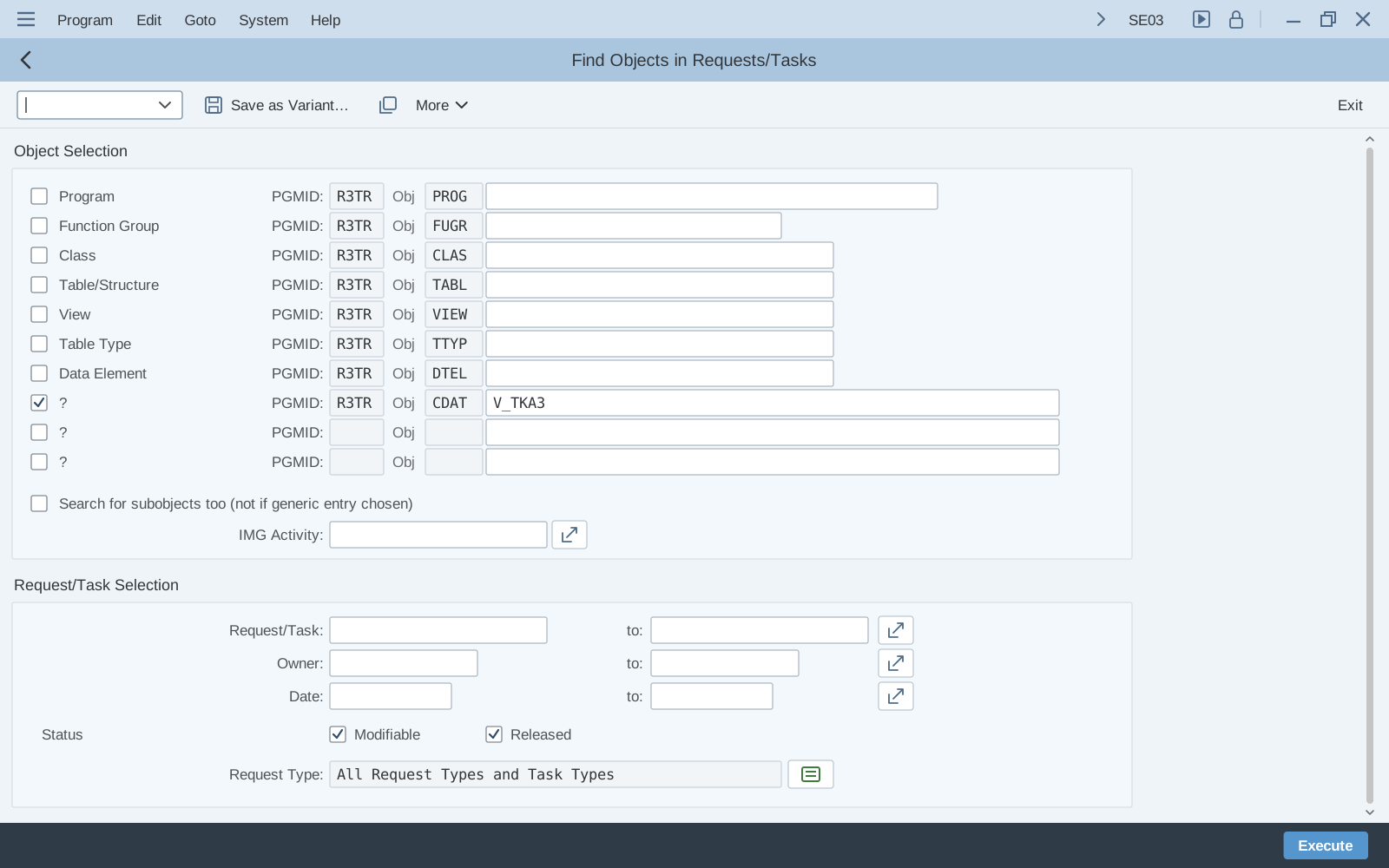
  1. SE03 Find Objects in Requests/Tasks selection screen with R3TR CDAT V_TKA3 entered on a free line and Modifiable and Released ticked

    Step 1 of 3

    SE03

    Search for the object

    In SE03, open Objects in Requests › Search for Objects in Requests/Tasks. Tick a free line and enter R3TR, the object type CDAT and the object name V_TKA3. Keep Modifiable and Released ticked so open and released requests are both searched, then click Execute.

    • R3TR · CDAT · V_TKA3
    • Modifiable and Released
    • Execute
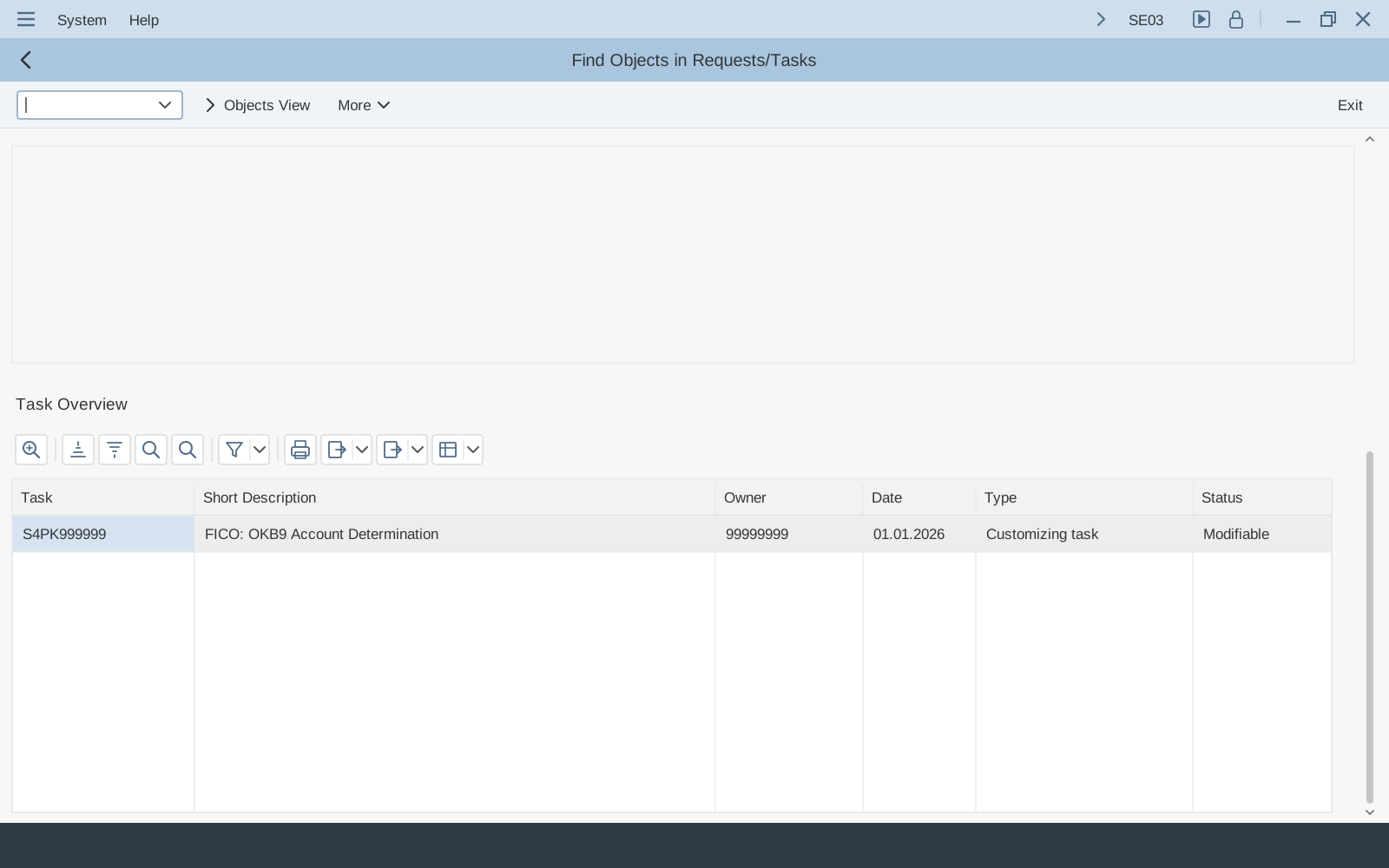
  2. SE03 Task Overview with task S4PK999999, short description FICO OKB9 Account Determination, owner 99999999, date 01.01.2026, customizing task, status modifiable

    Step 2 of 3

    SE03

    Read the task list

    The Task Overview lists every task that contains the object, with its short description, owner, date, type and status. The owner is the user ID of the person whose task recorded the change.

    • Task number
    • Owner (user ID)
    • Status
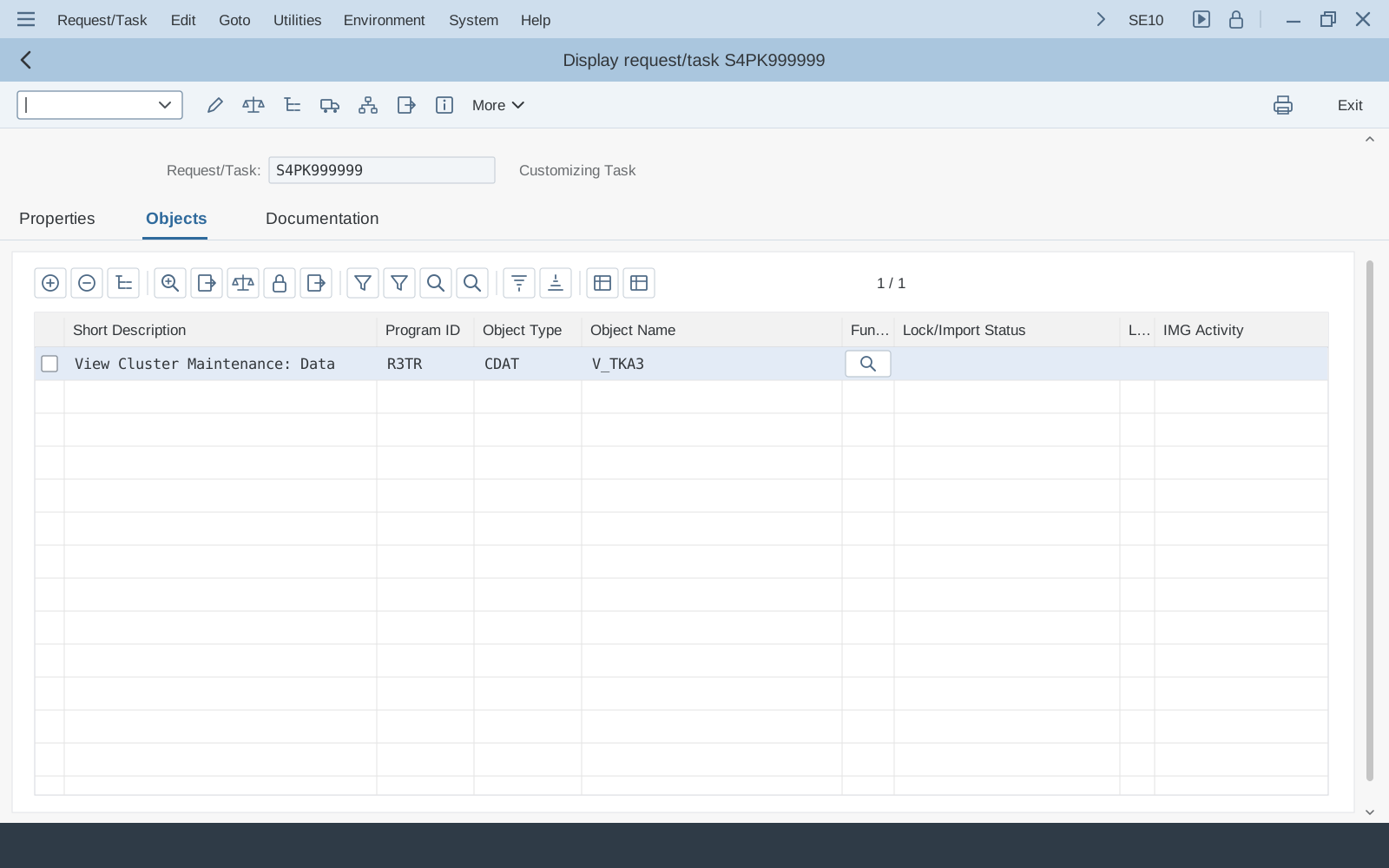
  3. SE10 Display request/task S4PK999999, customizing task, Objects tab with View Cluster Maintenance: Data, R3TR, CDAT, V_TKA3

    Step 3 of 3

    SE10

    Check what the task contains

    Open the task in SE10 and go to the Objects tab. V_TKA3 is there as R3TR CDAT, View Cluster Maintenance: Data. From the object list you can also open the table keys, which show exactly which entries were saved. Its request is the level above the task in SE09 or SE10. If it is the change you are looking for, talk to the owner.

    • Task and its type
    • Objects tab
    • R3TR · CDAT · V_TKA3

Before you search

Which object type do I search for?

SE03 searches by object, not by transaction, so you need the object’s type and name. Customizing saved through a maintenance view is recorded as view data, through a view cluster as view cluster data, and straight on a table as table contents.

Code is often recorded in pieces: a changed method as LIMU METH, a function module as LIMU FUNC. To find those pieces when you search for the class or function group, tick Search for subobjects too. It does not work with a generic name such as V_TKA*, as the screen itself says.

Know the SPRO activity but not its object? The same selection screen also has an IMG Activity field.

You changedSearch forNote
Entries of a customizing tableR3TR TABUTable contentsMaintained straight on the table.
Entries in a maintenance viewR3TR VDATView maintenance dataThe maintenance dialog is based on a view.
Entries in a view clusterR3TR CDATView cluster maintenance dataOKB9 saves through V_TKA3.
A program, class or function groupR3TR PROG · CLAS · FUGRRepository objectsRecorded in Workbench requests.
A table definitionR3TR TABLDictionary tableThe structure only. Its entries are TABU.

Sources: Transport event variables (TABU and VDAT dialogs) · OBJFUNC documentation (TABL, TABU) · CDAT V_TKA3 from the SE10 screenshot above

The toolset

Five transactions, one transport system

Requests are created and released in the Transport Organizer, searched and repaired with its tools, and imported with the Transport Management System.

SE09SE10

Transport Organizer

Create, display and release your requests and tasks.

  • SAP Help says both transactions call the initial screen of the Transport Organizer, so either one shows your requests.
  • When you release a task, its object entries are copied to the object list of its request.
  • Once every task is released, you can release the request itself.

Sources: Functions in the Transport Organizer · Releasing a task · Releasing tasks and requests

SE01

Transport Organizer (Extended View)

The same organizer with more selection screens and request types for special cases.

  • Its special request types get no automatic transport route and don’t follow configured deliveries.
  • Transport of copies: objects travel in their current version and their original system does not change.
  • Relocations move the original system of objects to another system, with or without a package change.

Sources: Transport Organizer (Extended View) · Transports of copies and relocations

SE03

Transport Organizer Tools

Search, analyze and repair around requests.

  • Search for Objects in Requests/Tasks finds every request or task that holds an object, as in the example above.
  • Include Objects in Transport Request and Merge Object Lists build a request from objects or from other requests.
  • Unlock Objects is an expert tool: careless use may lead to inconsistencies in the target system.

Sources: Functions of the Transport Organizer Tools

STMS

Transport Management System

Import released requests and run the landscape.

  • Released requests wait in the import queue of the target system; an administrator imports them now or schedules the import.
  • After an import into QAS, the delivery route puts the request in the queue of the next system, such as PRD.
  • The transport configuration is changed on the transport domain controller and distributed to every system in the domain.

Sources: Starting the import · Transport layers and transport routes · Distributing the TMS configuration

Also good to know

  • STMS_QAQA worklist: approve or reject requests in the quality system.
  • SCC4Client settings, including automatic recording of changes.
  • SE06System change option: can Repository and cross-client objects be changed in this system?
  • SCU0Customizing Cross-System Viewer: compare settings between systems.
  • SCU3Table history: who changed a logged table, and when.

Three systems

From DEV to PRD: how a request travels

Releasing a request is not the same as moving it. Each system has an import queue, and someone has to start each import.

  1. DEVDevelopment

    1. Save the changeWith automatic recording on, saving customizing opens the request prompt: pick one of your own requests or create one. The change goes into your task.
    2. ReleaseRelease your task, then the request. The export writes the request to the transport directory, and tp registers it for the target system.
  2. QASQuality assurance

    1. ImportThe request waits in the QAS import queue. Releasing imports nothing: an administrator starts the import in STMS or schedules it.
    2. Test and approveTest the change. With the QA approval procedure, every approval step must be approved; a rejected request is not imported into production.
  3. PRDProduction

    1. ImportAfter the QAS import, the delivery route marks the request for import into PRD, where it is imported the same way.

Current settings, such as exchange rates and posting periods, are meant to be maintained straight in the production client. There they are not recorded in a request, even when the client is closed to customizing changes.

Sources: Change recording in Customizing · Releasing tasks and requests · The route of a request into the target system · Transport directory · Starting the import · Transport layers and transport routes · Approving or rejecting requests · Client control and current settings

Under the hood

What is inside a request

A request is a container of tasks, and each task holds object entries and their keys. The same structure sits in a few tables you can read in SE16, which is what SE03 searches for you.

  1. RequestE070 · E07T

    Header and short text. A Workbench or a Customizing request; its owner administers and releases it.

  2. TaskE070

    A new request starts with one task per member, linked to the request. Changes go into the task of the person who made them, and a task only travels with its whole request.

  3. Object entryE071

    What changed, such as R3TR CDAT V_TKA3. When the task is released, its entries are copied to the request.

  4. Key entriesE071K

    Which entries: the table keys saved for that object.

Two kinds of request

Workbench request
Repository objects and cross-client customizing. Whether it is transportable depends on the transport route of the objects’ package.
Customizing request
Client-specific customizing of the client where it was created. With automatic recording on, you are asked for one when you save.

Sources: Change requests

Task types

Customizing task
Records a member’s client-specific customizing inside a Customizing request, as in the screenshots above.
Development/correction
In a Workbench request: the object is changed in its original system, usually where it was created.
Repair
In a Workbench request: the object is changed in another system, which includes every modification of SAP standard objects.

Sources: Changing objects · Transport requests for customizing

From the documentation

Tips that save a morning

SE03 found nothing?

The change may not be in any request: clients set to changes without automatic recording don’t ask for one, and current settings changed in a production client are never recorded. Try the table history in SCU3 next. It needs the profile parameter rec/client and a table that logs data changes, which SAP switches on for customizing tables by default. Logging slows down changes to the table.

Sources: Logging table changes · Log data changes · Client control and current settings

Community tip

Find one exact entry

Each saved entry is a line in table E071K: OBJNAME is the table, MASTERNAME the view or view cluster, and TABKEY the key, starting with the client. In SE16, filter E071K by MASTERNAME = V_TKA3 and TABKEY with a pattern that holds part of the key, such as *1000*, to list the requests and tasks that carry that entry; for a task, field STRKORR in E070 gives its request. It tells you the entry was in the request, not what changed.

Sources: SAP Community answer · E071K fields (SAP Help)

Compare QAS and PRD

The Customizing Cross-System Viewer compares customizing objects between clients or systems, for a project IMG, components, an object list or transport request, or a BC Set.

Sources: Customizing object comparison tools

Release order matters

A customizing request carries its entries as they are when it is released, not the change itself, and customizing objects in requests are not locked. Import an older request after a newer one and the older values come back. It is one reason SAP recommends as few transport requests as possible.

Sources: Transport requests for customizing · Change recording in Customizing

Lock the production client

For production SAP recommends the client role Production, no changes allowed for client-specific objects, and no changes to Repository and cross-client customizing objects. Current settings stay open.

Sources: System and client change options

Transports need RDDIMPDP

Exports depend on the background job RDDIMPDP in client 000. If it isn’t running, SAP says to start program RDDNEWPP once, as user DDIC, in client 000 and in every client used as a transport source or target. When transports hang, check this job first.

Sources: Releasing change requests · RDDIMPDP and RDDNEWPP

Frequently asked questions

What is the difference between SE09 and SE10?

SAP Help says both call the initial screen of the Transport Organizer, so you can use either one for your requests and tasks. SE01 is the extended view, with more selection screens and special request types, such as relocations, that get no automatic transport route.

Is the task owner the person who made the change?

Usually. Each member’s changes are recorded in his or her own task, but a task that is still open can be handed over to another owner. The request owner, often the project lead, administers and releases the request.

The request is released. Why isn’t it in production?

Releasing only exports it. Each import is started or scheduled by an administrator in STMS, first into QAS, and with the QA approval procedure the request must also be approved before production. Two more causes: a local request has no target system, and an export with errors stops there, so open its transport log.

Can I change customizing straight in production?

Only current settings, such as exchange rates and posting periods, are meant for that: in a production client they are not recorded in a request. Everything else should come through a transport, and SAP recommends setting production clients to no changes allowed.

References

Checked in November 2026. SAP Help pages for older releases are cited where SAP’s current pages describe the same function. Knowledge base articles open in full with an SAP for Me login.